01
Overview
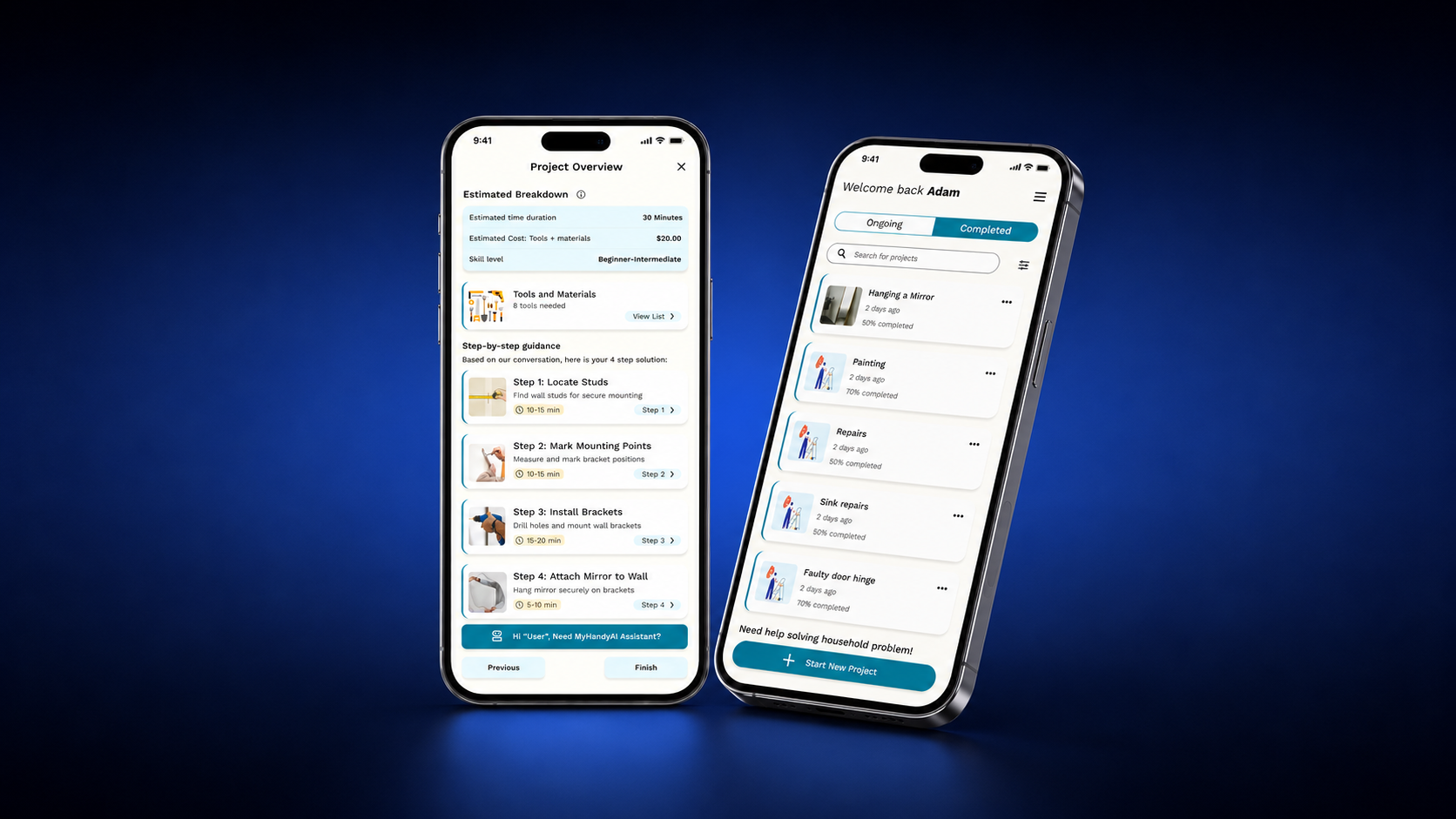
MyHandyAI is an AI-powered home repair assistant that helps homeowners and renters tackle repairs and DIY projects without calling in a professional.

"Describe a problem by voice, text, or photo, and the app generates a personalised, step-by-step repair guide along with a tailored tools-and-materials list."
Under the hood it combines an LLM with image recognition and contextual reasoning to turn scattered, generic DIY knowledge into one coherent walkthrough — the goal was to lower the barrier for novices, raise task success rates, and save people money on call-outs.
02
Customer challenge
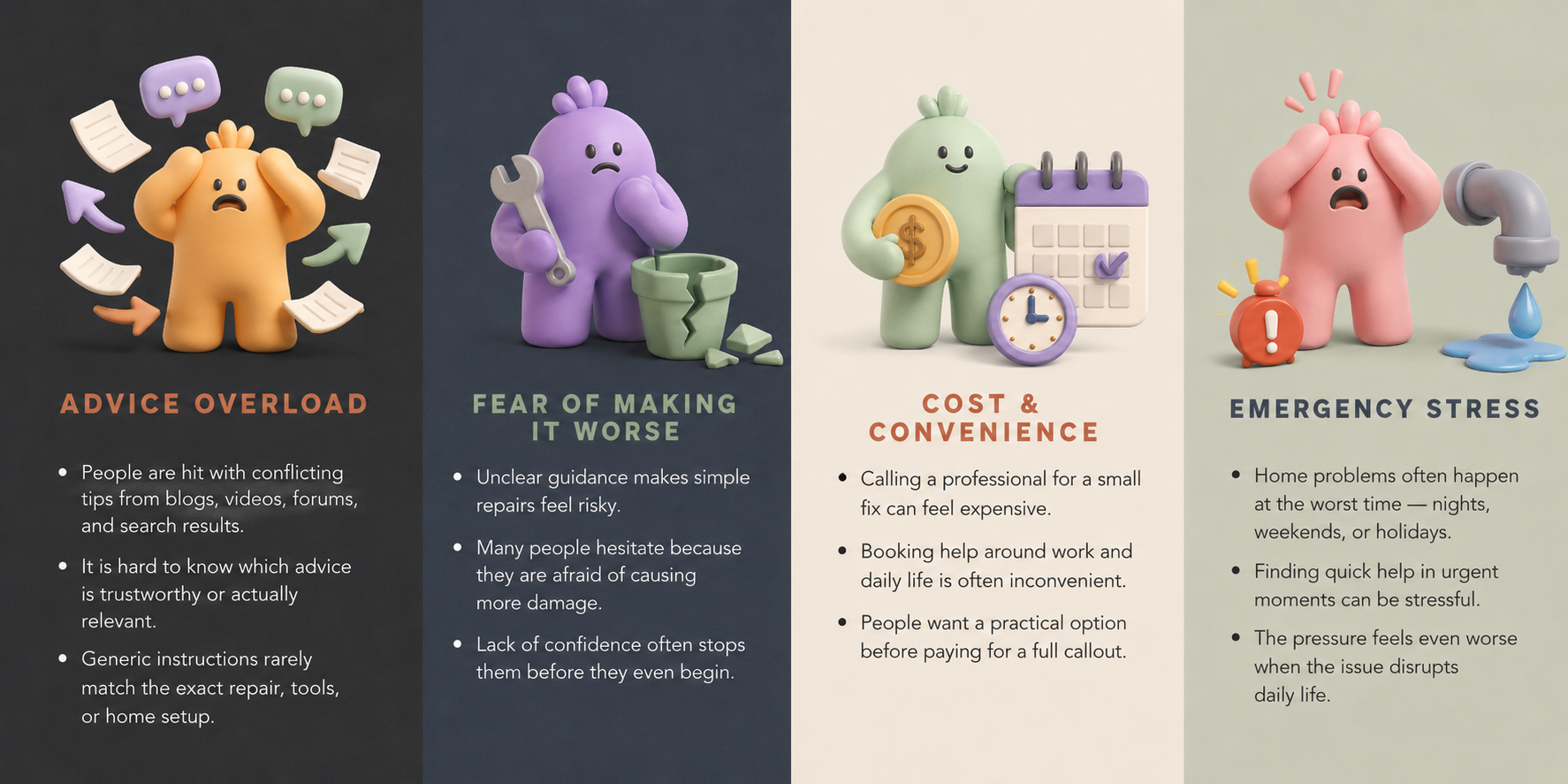
DIY is a genuinely large market with a genuinely common failure mode: people want to fix things themselves, but don't trust themselves to do it right.
A UK survey found close to 5 million people worry specifically about making DIY errors, and that the average person makes about four missteps a year — expensive enough, cumulatively, to either put people off DIY entirely or send them straight to a professional for jobs they could have done themselves with the right guidance.
"I get so anxious about home projects that I end up just not starting them — I don't trust myself to do it right the first time." — paraphrased from DIY community interviews
03
AI Hypothesis
We believe beginner DIYers do not lack online instructions; they need confidence that the instructions apply to their exact situation. If MyHandyAI uses multimodal AI to understand the user's repair context and provide personalised, step-by-step guidance, then beginner DIYers will trust the product more than generic search results — leading to higher task completion, satisfaction, retention, and paid conversion.
AI isn't used to generate more generic repair advice — the internet already has plenty of that. Its job is to organise, filter, and personalise: reading a photo, voice note, or a few typed words; asking the clarifying questions a knowledgeable friend would ask; adapting guidance to wall type, tool availability, object size and weight; explaining why a question or a tool matters; and offering a safer path forward when the user genuinely doesn't know the answer.
"The AI should not rush to answer. It should first understand the repair context, identify uncertainty, and guide the user safely."
That principle shaped the entire interaction model. Instead of instant, generic advice, MyHandyAI asks clarifying questions first — then delivers a tailored tool list and repair plan.
04
Personas
Three segments came out of research. Only one was right for an MVP.
Liam, the Anxious Fixer
Primary persona — first-time homeowner or long-term renter, millennial/Gen Z
Goals
Complete home repairs confidently without hiring a professional; spend less time researching before starting.
Pain points
Uncertainty about doing it right, no guidance tailored to his exact situation, research fatigue, anxiety about costly mistakes.
Pat, the Confident DIYer
Deprioritised for MVP — experienced DIYer
Goals
Find reliable tradespeople and source materials efficiently — not looking for step-by-step help.
Pain points
Not actively seeking DIY guidance, so harder and more expensive to acquire through the channels that work for Liam.
Colin, the Tradesman
Deprioritised for MVP, shapes long-term roadmap
Goals
Earn supplementary income, spend less time on vague job requests and inefficient directory platforms.
Pain points
Customers describe problems too vaguely; time wasted quoting jobs that turn out to be something else entirely.
Colin points at a real future feature — a paid "Virtual Tradesperson" mode inside MyHandyAI — but he and Pat were both explicitly cut from MVP scope so the team could go deep on Liam instead of wide across three very different jobs-to-be-done.
05
Customer journey
Mapping Liam's end-to-end experience surfaced where the emotional low points actually are — and they're earlier than you'd think.
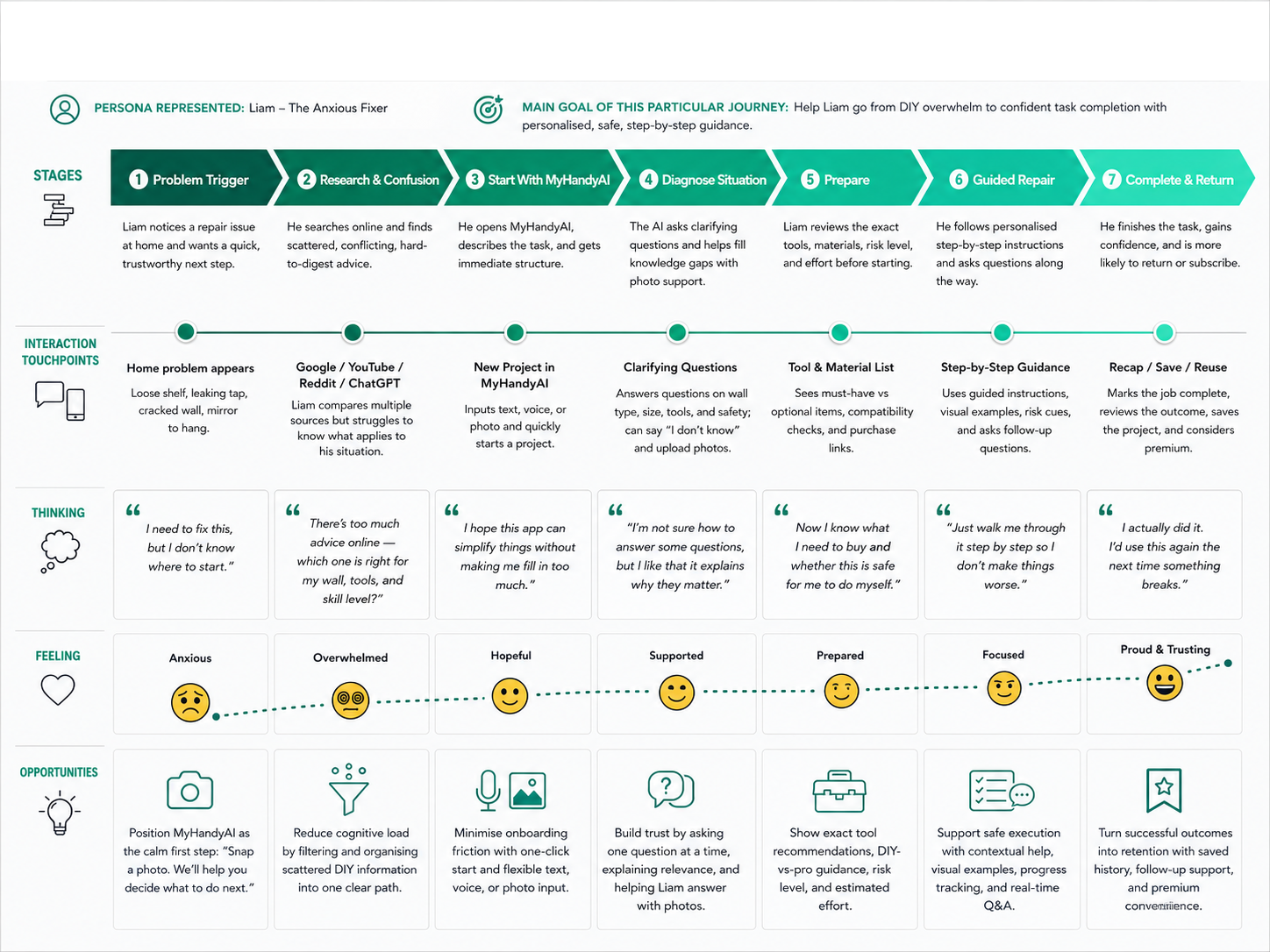
The emotional arc runs from anxiety and frustration during research, to cautious optimism once a task actually begins, ending in either relief (task succeeds) or regret (a costly mistake or a call to a professional after all). The friction points cluster early: an unclear problem definition, and conflicting advice scattered across YouTube, Google, and DIY forums — both of which happen before a single tool is picked up.
06
Data-driven feature prioritisation
20+ deep-dive interviews got us the "why." 200+ survey responses — sourced from Reddit DIY communities and in-store B&Q shoppers in the UK — got us the "how many, and who."
of people surveyed said they'd prefer to complete more home tasks themselves, if they had better guidance. 69.2% of respondents were aged 18–40, versus 29.5% over 40 — validating Liam as the right primary persona to build for first.
Insight 1 — people want bespoke help, as long as they trust the AI
"Smart repair suggestions based on my home, tools, and skills" scored 7.6/10 on usefulness. Openness to AI overall scored a more polarised 6.8/10 — some respondents were enthusiastic, others openly skeptical. The trust builders that came up again and again: personalised answers, visible proof of accuracy, reviews or recommendations, and visuals.
"I'd trust the AI more if it could actually look at a photo of the problem and understand it."— survey respondent
That pushed three features straight into MVP scope: letting users skip or rephrase clarifying questions, showing a plain-language "why we're asking this" next to each question, and adding a post-project rating so trust could be measured, not assumed.
Insight 2 — visual guidance isn't optional
Asked how they'd prefer to describe a problem: 33.8% said photo upload, 31.2% wanted a combination of inputs, 20.8% preferred text, and only 14.3% chose voice. "Custom repair guides with images" scored 7.3/10 on usefulness — visual input and visual output both beat text and voice outright.
That set the MVP interaction model: photo upload as a first-class input, and step-by-step guidance built from photos, GIFs, and short video clips rather than paragraphs of instructions.
07
AI model selection
Four criteria drove model selection:
Multimodal performance
Strong enough vision + language understanding to read photos and video of a repair site, not just text.
Latency
Fast enough to keep step-by-step guidance feeling responsive rather than a wait-for-the-model experience.
Cost efficiency at scale
Sustainable unit economics once usage grows past early adopters — not just cheap to prototype.
Room to extend
Headroom to grow into AR-guided repairs and regional building-code compliance in later phases.
We prototyped on the GPT-5 family, tiered by task: nano models for lightweight, fast validation and clarifying-question generation; mini models for summarisation, data extraction, and tool/material recommendations; and the full model reserved for complex, multi-step repair planning — balancing response speed against reasoning depth rather than running everything through the heaviest model by default.
Inputs
Problem descriptions (text or speech-to-text), photos and video of the repair site, context metadata (room type, existing tools, skill level), and external reference content pulled in via retrieval.
Outputs
Concise problem summaries, recommended tools and materials, bespoke step-by-step guides, cost/time estimates, safety warnings, and links to the most relevant video or product resources.
08
Data strategy
Two data sources feed the system: external reference content (YouTube, Reddit, Google Custom Search, manufacturer manuals — scraped weekly) and internal user data (photos, voice notes, project descriptions — ingested event-by-event as projects are submitted).
09
AI model validation
Five layers stand between a model's raw output and what a user actually sees:
10
Architecture & AI model
MyHandyAI was designed as a multimodal AI repair assistant, structured in four layers.
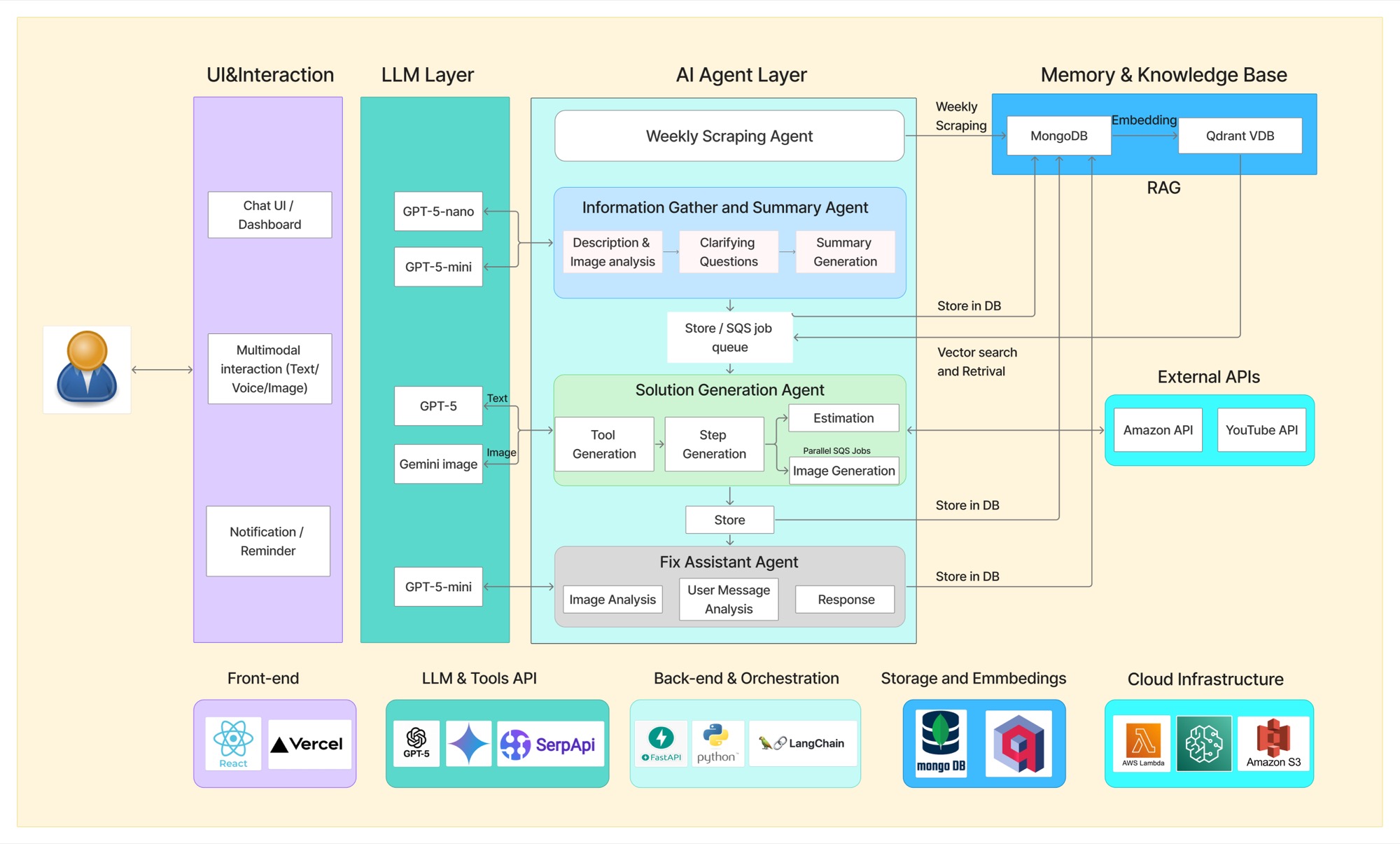
System architecture
"I want to hang a mirror on my wall."
From five clarifying questions — dimensions, approximate weight, wall type, hanging style, existing tools — the AI has enough context to recommend the right tools, the right wall anchor, a step-by-step plan, the safety risks, an estimated time, and what to do if the user doesn't know their wall type or the mirror's weight. It's why the MVP proof of concept centred on "hang a mirror" — it packs in every decision point that matters for trust: object size, weight, wall type, tool availability, anchor selection, safety risk, and confidence during execution.
11
Product roadmap
- Phase 1Months 1–3 · MVP
Core AI DIY assistance
Text/image/voice input, AI diagnosis, tailored recommendations, step-by-step guidance, feedback collection.
- Phase 2Post-MVP
Richer & more accurate
Enhanced image analysis, video content integration, expert validation layers.
- Phase 3Growth
Human + AI, together
Custom step-by-step video guides, expert tradesperson integration, the Virtual Tradesperson feature for Colin.
- Phase 4Scale
Network value
Community features, deeper personalisation, ecosystem partnerships.
12
User stories & acceptance criteria
The MVP flow, screen by screen:
- 01
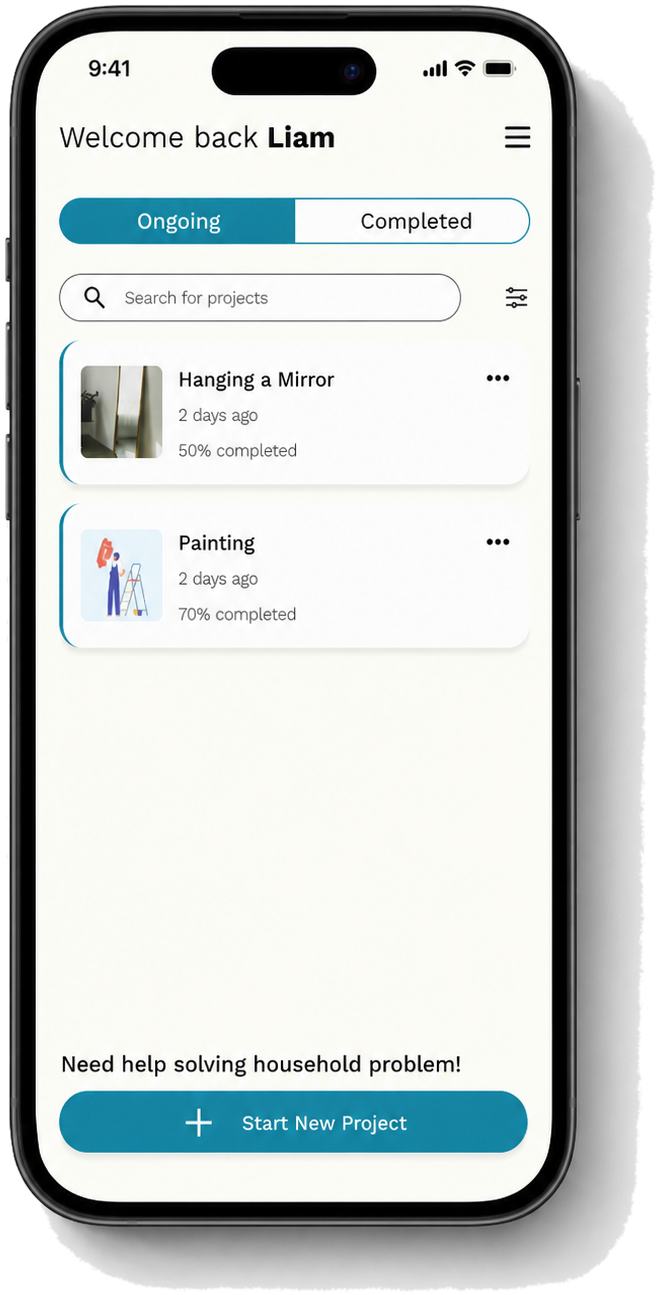
Entry point — start or resume a project.
- 02
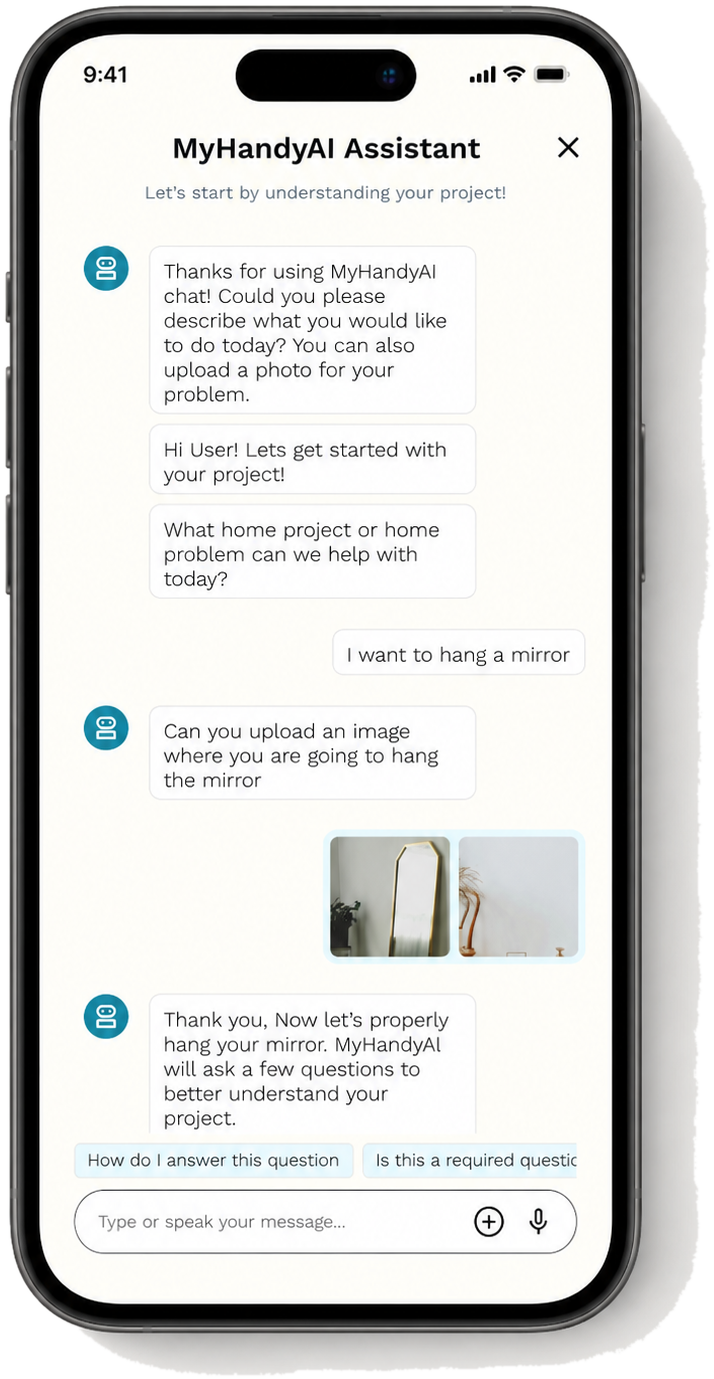
Capture the problem via text, photo, or voice, with follow-up clarifying questions.
- 03
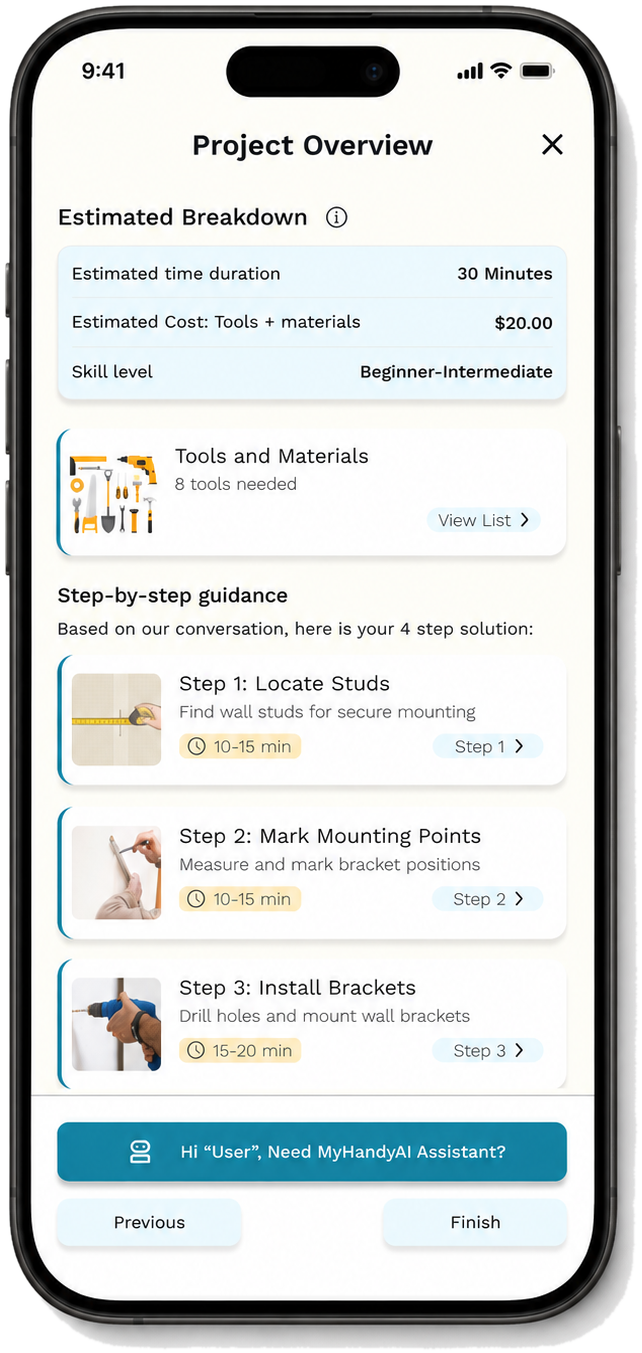
Estimated time, cost, and skill level, plus the generated tools list and step plan.
- 04
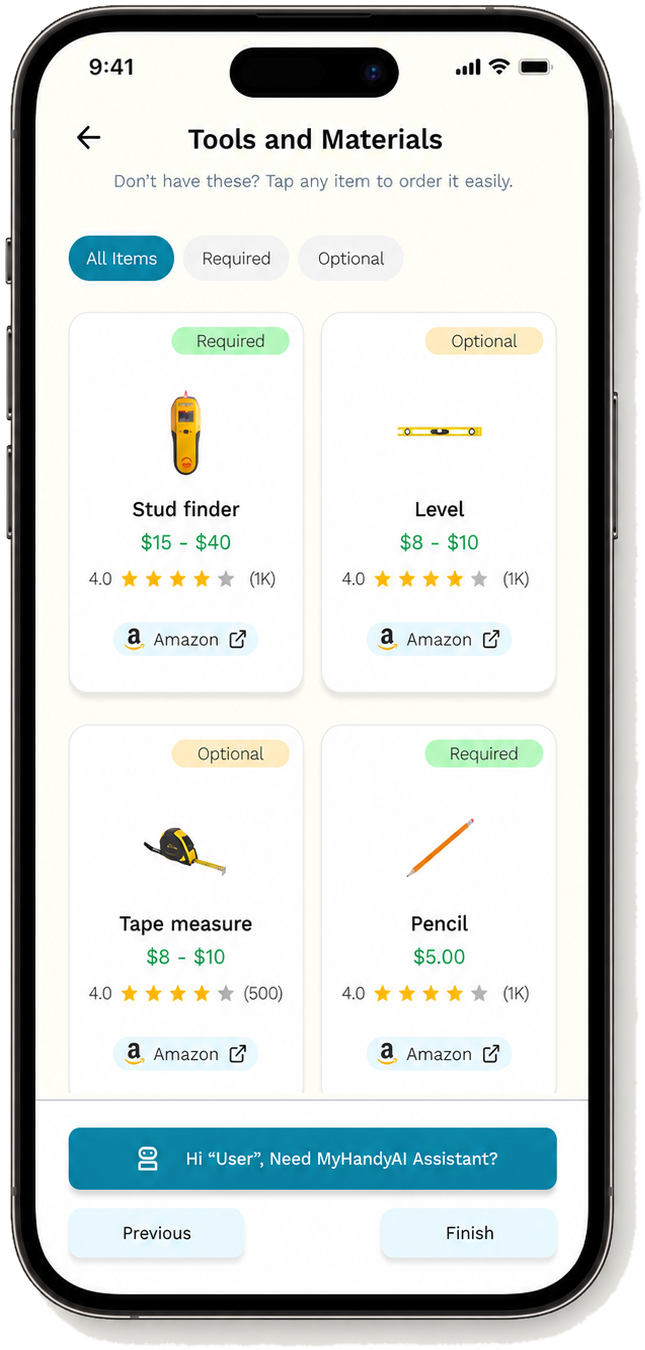
Required vs. optional tools and materials, with prices, ratings, and buy links.
- 05
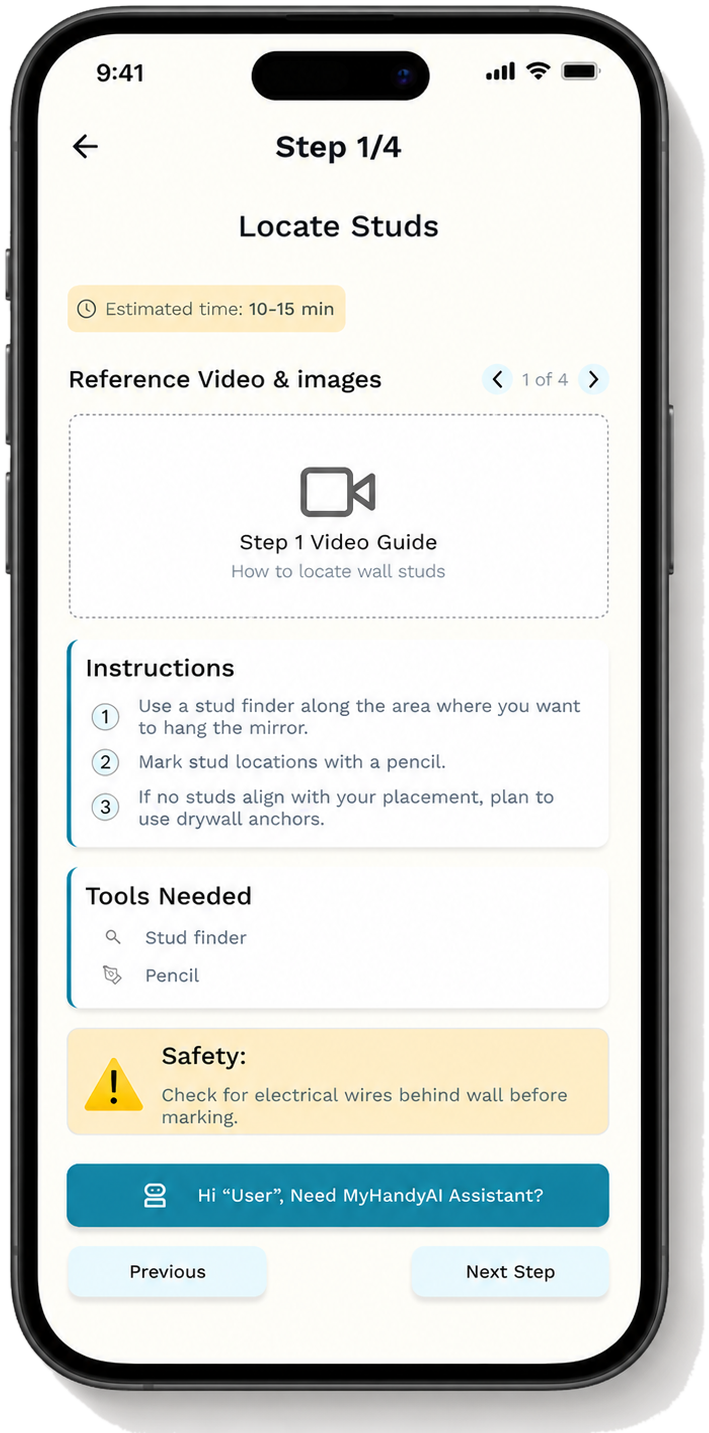
Visual-first instructions per step — video guide, numbered steps, and safety warnings.
- 06
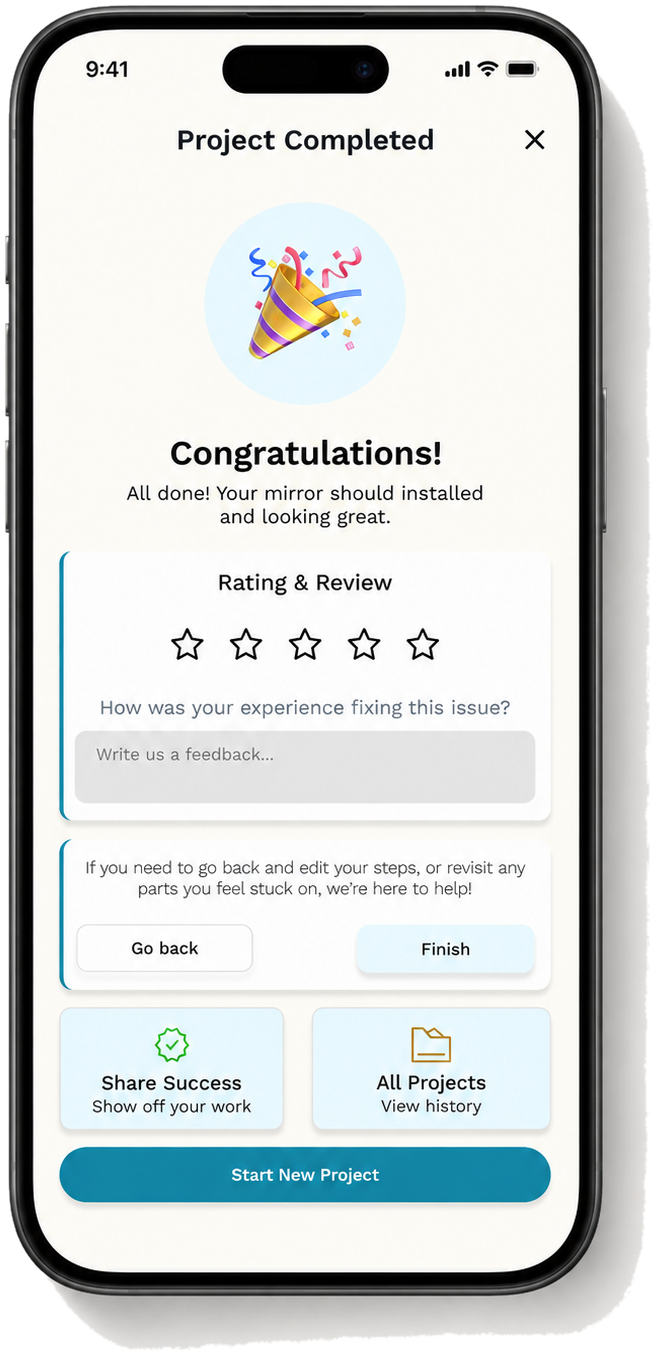
Completion, rating, and feedback — closing the loop back into the product.
13
Risks & remediations
| Risk | Why it matters | Product mitigation |
|---|---|---|
| Safety & liability | Confident but incorrect repair advice could cause injury or property damage. | Added risk classification, contextual warnings and hard stops for high-risk tasks, with escalation to a qualified professional when the system lacked sufficient context. |
| AI accuracy & reliability | Inconsistent online sources or incomplete user inputs could produce misleading guidance. | Built a curated, expert-reviewed knowledge base with retrieval-based responses, source validation and a safe "I don't know" fallback. |
| User trust | AI-generated instructions or visuals that do not match the user's situation could create false confidence. | Prioritised real reference media, clearly labelled approximations and explained why each step was recommended. |
| Beginner usability | Users may not know technical details such as wall type, material or drill suitability. | Designed guided clarification with plain-language explanations, photo input and "I don't know" as a supported response. |
| Adoption & retention | Users may return to Google or YouTube unless the experience is clearly more relevant and easier to follow. DIY tasks may also span several sessions. | Tested guidance against existing search journeys, then introduced personalised steps, saved progress and resumable projects. |
14
MVP
Scoped to months 1–3: text/image/voice input, AI clarifying questions, dynamic tool & material recommendations, visual-first step-by-step guidance, post-project feedback, and safety warnings throughout.
The app had to let someone complete two core tasks — hang a mirror and fix a running toilet — using text, image, or voice input, and return step-by-step guidance and tool suggestions for both.
Launch ran through a beta waitlist on Reddit, Pinterest, and Facebook DIY groups, micro-creator outreach, and a simultaneous Product Hunt + Reddit launch — which is what got us to 200+ organic waitlist signups in four weeks with zero paid acquisition.
15
Metrics
What I'd track post-launch
16
Business model
Four monetisation paths, not one — repair guidance, commerce, expert escalation, and ongoing home maintenance all sit on the same core product.
- Free — basic repair guidance for simple tasks
- Paid — unlimited projects, advanced visual guidance, saved history, tool checks, priority support
- Tool and material recommendations linked to Amazon and hardware retailers
- Revenue on every completed purchase, not just every session
- Handoff to a trusted handyman when a repair is too risky or complex
- Keeps users inside the product even when AI guidance isn't the right call
- Ongoing home-maintenance support, seasonal checklists, repair history
- Turns a one-off repair into a standing relationship
17
Lessons learned
1. AI products need trust, not just intelligence
For home repair, users aren't only judging whether an answer sounds correct — they're judging whether they can safely act on it. That made trust the central product principle: the AI had to explain why it was asking, show uncertainty when it existed, and offer a safer fallback.
2. Personalisation starts before the answer
The single biggest improvement came from delaying the final instruction until enough context had been gathered. Asking clarifying questions first made every answer feel more specific, relevant, and trustworthy — even before the user saw a single step.
3. "I don't know" is an important user state
Beginner DIYers often don't have the technical detail a good answer needs. Designing for uncertainty — instead of treating missing information as a dead end — became a core part of the experience.
4. Visual guidance must be accurate to be useful
Images and video are powerful for DIY, but an irrelevant visual damages trust faster than no visual at all. That's what pushed the decision to retrieve real examples first, and only show approximations with an explicit caveat.
5. MVP discipline matters
The product could sprawl in a dozen directions — tool commerce, a handyman marketplace, AR-guided repair, insurance partnerships. The strongest MVP stayed on one loop:
describe → clarify → prepare → guide → support → complete
Staying inside that loop kept the focus on the thing that actually mattered: helping one person finish one repair with confidence.
Revisiting MyHandyAI pushed me to think about AI as more than content generation — as contextual decision support. It isn't a chatbot that answers home-repair questions; it's a guided system built around user confidence, safety, and getting the job actually done. The biggest lesson carrying into the next build: a good AI product doesn't just answer the question in front of it. It helps someone make a better decision in a moment they weren't sure about.